一、学习内容介绍
Spring概念
IOC容器
Aop
JdbcTemplate
事务管理
Spring5的新特征
二、Spring框架概述
1、Spring是开源的JavaEE框架
2、Spring可以解决企业应用开发的复杂性
3、Spring有两个核心部分:IOC和Aop
(1)==IOC:控制反转,把创建对象的过程交个Spring进行管理==
(2)==Aop:面向切面,在不修改源代码的条件下进行功能的增强==
4、Spring框架的特点
(1)方便解耦,降低耦合性,简化开发
(2)APP编程支持
(3)方便程序的测试
(4)方便和其他框架整合使用
(5)方便进行事务管理
(6)降低JavaEE API的开发难度
三、Spring 5的下载与安装
需要的jar包位于压缩包的lib目录里
Spring框架核心的jar包主要是4个,包括:Beans、Core、Context、Expression

四、IOC容器
- (1)IOC是什么和IOC的底层原理
- (2)IOC接口(BeanFactory)
- (3)IOC操作Bean原理(基于xml)
- (4)IOC操作Bean原理(基于注解)
1.IOC是什么和IOC的底层原理
(1)控制反转,把对象的创建和对象之间的调用过程交给Spring进行管理
(2)使用IOC的目的:降低耦合度
2. IOC的底层管理
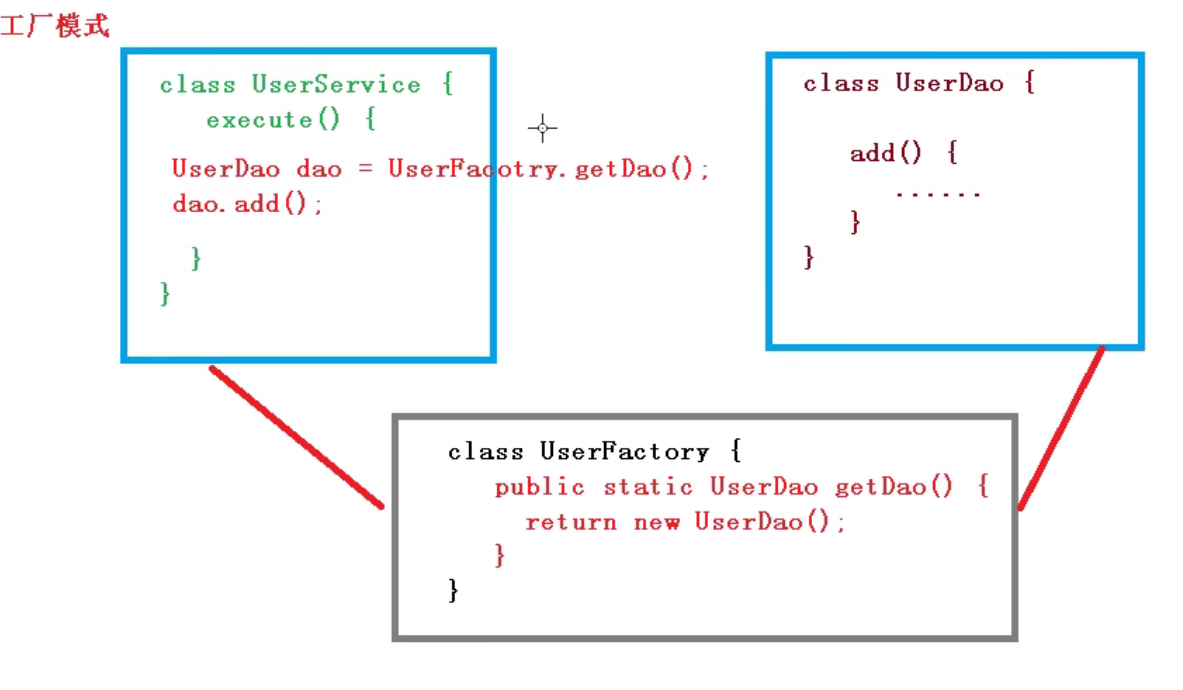
(1)xml解析、工厂模式、反射
工厂模式图所示:
IOC的过程:
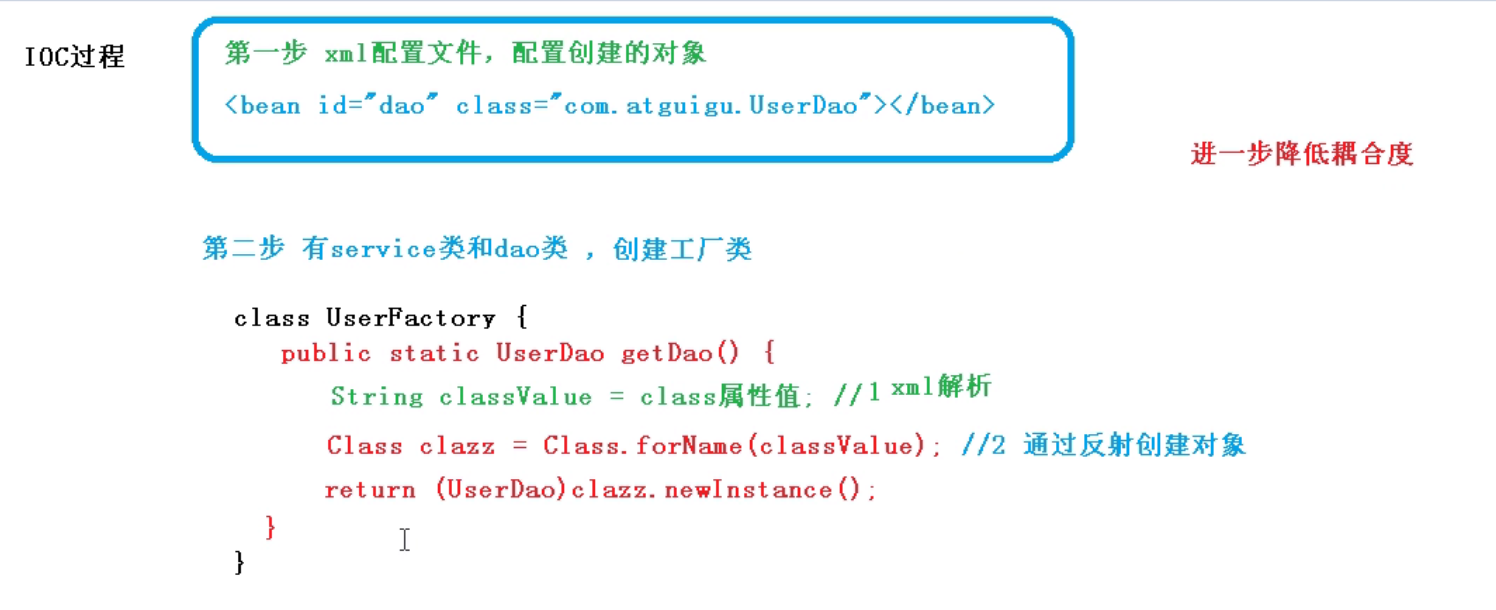
(2)xml解析、反射
(3)IOC接口
- IOC思想基于IOC容器完成,IOC容器底层就是对象工厂
- Spring提供实现IOC容器的两种基本方式(两个接口):
- BeanFactory:IOC容器的基本实现,是Spring的内部的使用接口,一般不提供开发人员使用
- ==特点:加载配置文件时候不会创建对象 ,而在获取/使用的时候再进行创建==
- ApplicationContext:是BeanFactory的一个子接口,提供更多更强大的功能,一般提供开发人员使用
- ==特点:在加载配置文件的时候就会把配置文件对象进行创建==
- 一般使用ApplicationContext
- ApplicationContext接口中的主要实现类
- FileSystemXMLApplicationContext:加载配置文件时,后面加的配置文件在硬盘中的位置,即带有盘符的路径(我理解为一种绝对路径
- ClassPathXmlApplicationContext:加载配置文件时,后面加的是配置文件在Web项目中的src目录下的路径(我理解为一种相对路径
- BeanFactory中的子接口
- ConfigureApplicationContext,是BeanFactory的子接口之一,里面包含的是一些拓展功能等内容
五、IOC的基本操作
1.IOC操作Bean管理
(1) Spring两种类型的bean
普通bean和工厂bean
- 区别:
- 普通bean:在配置文件中定义的bean的类型就是返回类型
- 工厂bean:在配置文件中定义的bean的类型可以和返回类型不一样
* 实现工厂Bean的操作过程
==给Admin类引入一个接口FactoryBean,并使用一个泛型类的写法
实现一个工厂bean,设置Admin确能够返回一个User对象
//Admin.class

public class Admin implements FactoryBean<User> {
    private String id;

    public Admin(String id) {
        this.id = id;
    }

    public Admin() {
    }

    @Override
    public String toString() {
        return "Admin{" +
                "id='" + id + '\'' +
                '}';
    }

    //    返回bean的实例
    @Override
    public User getObject() throws Exception {
        //暂时这么写,底层是工厂加反射,后续要记得回来修改
        User user = new User();
        user.setName("我爱你");
        return user;
    }

    //    返回bean的类型
    @Override
    public Class<?> getObjectType() {
        return null;
    }

    //    是否是一个单例
    @Override
    public boolean isSingleton() {
        return false;
    }
}
//testDemo
public class testFactoryBean {
@Test
public void testFb() {
//利用Admin的配置文件
ApplicationContext context= new ClassPathXmlApplicationContext("bean3.xml");
//使用User类的文件,创建User对象
User user = context.getBean("Admin",User.class);
System.out.println(user.toString());
}
}(2)Bean的作用域
在Spring里,可以设置创建bean是单实例对象还是多实例对象,==默认为单实例对象==。
如何设置为多实例 *
a. 在Spring配置文件中bean标签里有一个属性(scope),用于设置单实例还是多实例
- scope属性第一个值是singleton,也就是默认值,表示单实例对象
- 此种情况下,==创建的两个对象的地址相同==
//2.获取创建的配置文件
   User user1 = context.getBean("user", User.class);
   User user2 = context.getBean("user", User.class);
   //3.做输出
   System.out.println(user1);
   System.out.println(user2);
运行结果:
Picked up JAVA_TOOL_OPTIONS: -Dfile.encoding=UTF-8
wzh.Spring5.User@1a482e36
wzh.Spring5.User@1a482e36- scope属性第二个值是prototype,表示多实例对象
- 修改配置文件中,bean的scope属性值为prototype后,==创建的两个对象的地址不同==
<bean id="user" class="wzh.Spring5.User" scope="prototype"></bean>运行结果:
Picked up JAVA_TOOL_OPTIONS: -Dfile.encoding=UTF-8
wzh.Spring5.User@223191a6
wzh.Spring5.User@49139829
b. scope属性的singleton和prototype区别
- singleton,也就是默认值,表示单实例对象,而prototype,表示多实例对象;
- 设置scope的值为singleton时,在==加载配置文件的时候==就会完成单实例对象的创建
- 设置scope的值为prototype时,不在加载配置文件的时候就会完成单实例对象的创建,而==在调用getBean()方法时==,再完成多实例对象的创建
d. 不常用:scope的值也可以是request和session,如果值为这二者,则每次创建对象都会放在request / session的域对象中
(3)Bean的生命周期
* 什么是生命周期
- 从对象创建到销毁的过程就是生命周期
* 生命周期内容
- 通过构造器创建bean实例
- 为bean中的属性设置值或对其他bean的引用 (调用 set() 方法)
- 调用bean的初始化方法(需要专门配置初始化方法)
- 使用bean(对象获取到)
- 当容器关闭的时候,调用bean的销毁方法(需要专门配置销毁方法)
* bean的生命周期代码实现
<!--xml配置文件-->

<?xml version="1.0" encoding="UTF-8"?>
<beans xmlns="http://www.springframework.org/schema/beans"
       xmlns:xsi="http://www.w3.org/2001/XMLSchema-instance"
       xmlns:p="http://www.springframework.org/schema/p"
       xsi:schemaLocation="http://www.springframework.org/schema/beans http://www.springframework.org/schema/beans/spring-beans.xsd">
<!--利用set()方法实现ser对象的创建,并注入属性-->
        <bean id="user" class="wzh.Spring5.bean.User" init-method="init" destroy-method="destory">
            <property name="name" value="james lee"/>
        </bean>
</beans>
//User对象文件
public class User {
private String name;
public void setName(String name) {
this.name = name;
System.out.println("2.set方法设置属性值");
}
public User() {
System.out.println("1.已创建bean实例");
}
//初始化方法
public void init() {
System.out.println("3.调用初始化方法");
}
//销毁bean对象方法
public void destory() {
System.out.println("5.调用销毁bean对象方法");
}
}//testSpring5.java
public class testSpring5 {
@Test
public void testAdd() {
//1.加载Spring的配置文件
// ApplicationContext context =
// new ClassPathXmlApplicationContext("bean1.xml");
// ApplicationContext的接口中没有close()方法,所以使用了ApplicationContext
ClassPathXmlApplicationContext context =
new ClassPathXmlApplicationContext("bean1.xml");
//2.获取创建的配置文件
User user = context.getBean("user", User.class);
System.out.println("4.得到bean实例对象");
//3.做输出
System.out.println(user);
//手动调用销毁方法
context.close();
}
}运行结果:
Picked up JAVA_TOOL_OPTIONS: -Dfile.encoding=UTF-8
1.已创建bean实例
2.set方法设置属性值
3.调用初始化方法
4.得到bean实例对象
wzh.Spring5.bean.User@3e694b3f
5.调用销毁bean对象方法
d. 后置处理器
除了这五步基本操作,还有==两步的后置处理==
- 通过构造器创建bean实例
- 为bean中的属性设置值或对其他bean的引用 (调用 set() 方法)
- ==把bean实例传给bean后置处理器的方法:postProcessBeforeInitialization==
- 调用bean的初始化方法(需要专门配置初始化方法)
- ==把bean实例传给bean后置处理器方法:postProcessAfterInitialization==
- 使用bean(对象获取到)
- 当容器关闭的时候,调用bean的销毁方法(需要专门配置销毁方法)
e. 添加后置处理器的代码实现
创建类,实现接口BeanPOSTProcessor,创建后置处理器
import org.springframework.beans.BeansException;
import org.springframework.beans.factory.config.BeanPostProcessor;

public class BeanPostProcess implements BeanPostProcessor {
    @Override
    public Object postProcessBeforeInitialization(Object bean, String beanName) throws BeansException {
        System.out.println("3.初始化之前调用后置处理器");
        return bean;
    }

    @Override
    public Object postProcessAfterInitialization(Object bean, String beanName) throws BeansException {
        System.out.println("4.初始化之后调用后置处理器");
        return bean;
    }
}- 在配置文件中添加后置处理器对象,配置后置处理器
<!--配置后置处理器-->
<!--后置处理器会对当前配置文件中的所有bean添加后置处理器的处理-->
<bean id="beanPostProcess" class="wzh.Spring5.bean.BeanPostProcess"></bean>
运行结果:
Picked up JAVA_TOOL_OPTIONS: -Dfile.encoding=UTF-8
1.已创建bean实例
2.set方法设置属性值
3.初始化之前调用后置处理器
4.调用初始化方法
4.初始化之后调用后置处理器
6.得到bean实例对象
wzh.Spring5.bean.User@41d477ed
7.调用销毁bean对象方法
(4)什么是Bean管理
Bean管理包括两个操作
- Spring创建对象
- Spring注入属性
2.Bean管理操作的两种方式
A. 基于xml配置文件实现对象创建
<!--配置User对象创建-->
<bean id = "user" class = "wzh.Spring5.User"></bean>
在Spring配置文件中,使用bean标签,标签里面添加对应属性。就可以实现对象创建;
bean标签的常用属性;
a——id 属性:对象的唯一标识(不能有特殊符号
b——class属性创建对象的一个类全路径(包类路径:包名.类名)
c——name属性:功能与id属性类似,现已不经常使用(可以有特殊符号’
==d——创建对象的时候,默认调用无参构造方法创建对象;==
B.基于xml配置文件注入属性
DI:依赖注入,也就是注入属性,在对象已创建的基础之上完成(一)、set()方法注入属性值
==此时!需要无参构造方法==
==类中没有构造方法,系统会默认创建一个无参构造方法==
==而如果类中有一个有参构造方法,此时系统就不会自动创建无参构造方法==
在类中创建属性,并创建对应属性的set()方法
public class User {
    private String name;
    private String tel;

    public void setName(String name) {
        this.name = name;
    }

    public void setTel(String tel) {
        this.tel = tel;
    }

        @Override
    public String toString() {
        return "User{" +
                "name='" + name + '\'' +
                ", tel='" + tel + '\'' +
                '}';
修改Spring的xml配置文件,配置对象创建及属性注入
<!--配置User对象创建-->
<bean id = "user" class = "wzh.Spring5.User">
	<!--使用property标签完成属性注入
		name属性:类里面的属性名称
		value属性:属性的值
	-->
	<property name="name" value="james lee"></property>
</bean>
//使用一个demo验证 //testDemo.java @Test public void testAdd() { //1.加载Spring的配置文件 ApplicationContext context = new ClassPathXmlApplicationContext("bean.xml"); //2.获取创建的配置文件,利用xml配置文件完成对象创建及属性注入 User user = context.getBean("user", User.class ); //3.做输出 System.out.println(user); //4.调用对象拥有的方法 System.out.println(user.toString()); }p名称空间注入(了解)
简化上述xml配置方法,进行属性注入- 在xml文件头部beans标签后面添加p名称空间
<beans xmlns="http://www.springframework.org/schema/beans" xmlns:xsi="http://www.w3.org/2001/XMLSchema-instance" xmlns:p="http://www.springframework.org/schema/p" xsi:schemaLocation="http://www.springframework.org/schema/beans http://www.springframework.org/schema/beans/spring-beans.xsd">- 操作bean标签,进行属性注入
<bean id="user" class="wzh.Spring5.User" p:name="wzh" p:tel="666666">
    </bean>
注入空值 (null):使用
标签 <!--给tel属性注入空值null--> <property name="name"> <null/> </property>包含特殊符号的属性值:CDATA标签
<!--注入包含特殊符号的属性值
1. 对特殊符号进行转义
2. 利用<![CDATA[……]]>标签,在省略号位置加入想要使用的特殊符号
-->
<property name="book">
            <value>
                <![CDATA[《活着》]]>
            </value>
        </property>
注入属性-外部bean
(1) 创建两个对象类:service类和dao类
(2) 在service类中调用dao类中的方法
//DaoService类
package wzh.Spring5.service;
import wzh.Spring5.dao.UserDao;

public class UserService {
//创建UserDao属性类型,生成set()方法
    private UserDao userDao;

    public void setUserDao(UserDao userDao) {
        this.userDao = userDao;
    }

    public void add(){
        System.out.println("Service add~~~");
        userDao.update();
    }
}

//UserDaoImpl类
package wzh.Spring5.dao;
public class UserDaoImpl implements UserDao{

    @Override
    public void update(){
        System.out.println("dao update~~~");
    }
}

//UserDao接口
package wzh.Spring5.dao;
public interface UserDao {
    public void update();
}
(3)在Spring配置文件中进行配置
<!-- service和dao的对象进行创建-->
<bean id="UserService" class="wzh.Spring5.service.UserService">
    <!--注入userDao对象
       name 是属性名称
       ref 是创建对象对应bean标签的id值
    -->
    <property name="userDao" ref="userDao"/>
</bean>
<bean id="userDao" class="wzh.Spring5.dao.UserDaoImpl"/>
实现了给对象注入其他的类
注入属性—内部bean和级联赋值
在实体类中表示一对多的关系
(二)、有参构造方法注入属性值
==此时不需要无参构造方法==
1.在类中创建属性,并创建对应属性的有参构造方法
public class User {
    private String name;
    private String tel;

    public User(String name, String tel) {
        this.name = name;
        this.tel = tel;
    }

    public void add() {
        System.out.println("add~~~~");
    }
2.利用有参构造方法注入属性
<!--利用有参构造方法实现User对象的创建,并注入属性-->
    <bean id="user" class="wzh.Spring5.User">
        <!--使用constructor-arg标签完成属性注入
		name属性:类里面的属性名称
		value属性:属性的值
		index属性:索引,代表对象中的第几个参数,0代表第一个,1代表第二个以此类推
	-->
        <constructor-arg name="name" value="james lee"/>
        <constructor-arg name="tel" value="12138"/>

        <!--
	    <constructor-arg index="0" value="james lee"/>
        <constructor-arg index="1" value="12138"/>
	-->
    </bean>
同样可以利用testDemo进行验证
C. 基于xml配置文件实现自动装配
==在实际使用中一般使用注解的方式做到,但利用xml也可以做到==
- 根据指定的装配规则(属性名称或属性类型),Spring自动将匹配的属性值注入
- 演示自动装配的实现
<!--自动装配
bean标签的属性 autowira,可以配置自动装配

autowira有常用的两个值
    byName:根据属性名注入。要求bean的id的值和类属性名称一致,如下;
            private Dep depment;
            <bean id="depment" class="wzh.Spring5.bean.Dep"/>

    byType:根据属性类型注入
            private Dep depment;
            <bean id="dep" class="wzh.Spring5.bean.Dep"/>
            根据类型注入相同类型的bean不能定义多个,否则会报错
-->
<bean id="emp" class="wzh.Spring5.bean.Emp" autowire="byType">
    <!--手动装配
    <property name="depment" ref="dep"/>
    -->
</bean>
<bean id="dep" class="wzh.Spring5.bean.Dep"/>
D.基于xml配置文件实现引入外部文件进行属性注入
- 配置德鲁伊连接池
- 引入德鲁伊连接池的jar包(依赖)德鲁伊连接池jar下载
<!--直接配置连接池-->
<bean id="dataSource" class="com.alibaba.druid.pool.DruidDataSource">
    <property name="driverClassName" value="com.mysql.jdbc.Driver"/>
    <property name="url" value="jdbc:mysql://localhost:3306/users?characterEncoding=UTF-8"/>
    <property name="username" value="root"/>
    <property name="password" value="666666"/>
</bean>- 创建外部属性文件,即properties格式文件,存储数据库信息
#等号左侧的内容可以随便写,最好不写某一个单词,以防止冲突
prop.driverClass =com.mysql.jdbc.Driver
prop.url = jdbc:mysql://localhost:3306/users?characterEncoding=UTF-8
prop.name=root
prop.password=666666- 将properties格式文件引入Spring配置文件中
<beans xmlns="http://www.springframework.org/schema/beans"
       xmlns:xsi="http://www.w3.org/2001/XMLSchema-instance"
       xmlns:context="http://www.springframework.org/schema/context"
       xsi:schemaLocation="http://www.springframework.org/schema/beans http://www.springframework.org/schema/beans/spring-beans.xsd
http://www.springframework.org/schema/context http://www.springframework.org/schema/context/spring-context.xsd">- 在Spring配置文件中使用 ==context:property-placeholder== 标签引入外部属性文件
<!--入外部属性文件-->
<context:property-placeholder location="classpath:JDBC.properties"/>

<!--配置连接池-->
<bean id="dataSource" class="com.alibaba.druid.pool.DruidDataSource">
    <property name="driverClassName" value="${prop.driverClass}"/>
    <property name="url" value="${prop.url}"/>
    <property name="username" value="${prop.name}"/>
    <property name="password" value="${prop.password}"/>
</bean>
A.基于注解的方式实现对象创建
- 注解是代码的特殊标记
- ==格式:@ + 注解名称 (属性名称 = 属性值,属性名称 = 属性值……)==
- 注解可以作用在方法、类或者属性上面
- 注解目的:简化xml配置,以更简洁的方式展现
@Component:是一种普通的组件,对象普通创建
@Service:一般用在业务逻辑或者Service层上
@Controller:一般用在WEB层上
@Repository:一般用在DAO层或者
没有要求一定那个注解用在那一层
==上面的四个注解功能是一样的的,都可以用来创建Bean实例==
- 第一步: 引入依赖(jar包)spring-aop-5.2.3.RELEASE.jar
- 第二步:在配置文件中,开启组件扫描
<?xml version="1.0" encoding="UTF-8"?>
<beans xmlns="http://www.springframework.org/schema/beans"
       xmlns:xsi="http://www.w3.org/2001/XMLSchema-instance"
       xmlns:context="http://www.springframework.org/schema/context"
       xsi:schemaLocation="http://www.springframework.org/schema/beans http://www.springframework.org/schema/beans/spring-beans.xsd
        http://www.springframework.org/schema/context http://www.springframework.org/schema/context/spring-context.xsd">
    <!--一、导入名称空间context-->

    <!--二、开启组件扫描
    1. 如果扫描多个包,多个包之间使用逗号隔开
    2. 如果扫描多个包,可以扫描上层目录
    -->
    <context:component-scan base-package="wzh.Spring5"></context:component-scan>
</beans>- 第三步:创建对象类,并加上创建对象注解
//在注解中value属性值可以省略不写
//默认的value值是首字母小写后的类名称
@Component(value = "user")//类似于bean标签下的id属性
public class User {
    public void add() {
        System.out.println("add~~~~");
    }
}- 定义到包中==扫描哪些文件==
   <!-- use-default-filters="false" 表示现在不使用默认的filter,而使用自己接下里设置的filter

type="annotation" expression="org.springframework.stereotype.Component"
这里的内容表示到wzh.Spring5包里只扫描带Component注解的类
-->
   <context:component-scan base-package="wzh.Spring5" use-default-filters="false">
       <context:include-filter type="annotation" expression="org.springframework.stereotype.Component"/>
</context:component-scan>- 定义包中的那些==文件不扫描,其他的全都扫描==
<!-- use-default-filters="false" 表示现在不使用默认的filter,而使用自己接下里设置的filter

	type="annotation" expression="org.springframework.stereotype.Component"
	这里的内容表示到wzh.Spring5包里不扫描带Component注解的类,其他的全都扫描
	-->
    <context:component-scan base-package="wzh.Spring5" use-default-filters="false">
        <context:exclude-filter type="annotation" expression="org.springframework.stereotype.Component"/>
    </context:component-scan>
B.基于注解的方式注入属性
注入对象类型的属性值
@AutoWired:根据属性类型进行自动注入
@Qualifier:根据属性名称进行自动注入
@Resource:根据属性类型进行自动注入,也可以可以根据属性名称进行自动注入
注入一般类型的属性值
- @Value:注入普通类型属性